
Creation and classification
A ticket can be entered manually by an operator or generated automatically from other channels. Each request is classified by type, priority, category and status, so work can be organised immediately.
Tickets
No more requests scattered across phone calls, emails, chats and spreadsheets. With ADonePRO every report is recorded, assigned and monitored through to full resolution.
A ticket can be entered manually by an operator or generated automatically from other channels. Each request is classified by type, priority, category and status, so work can be organised immediately.
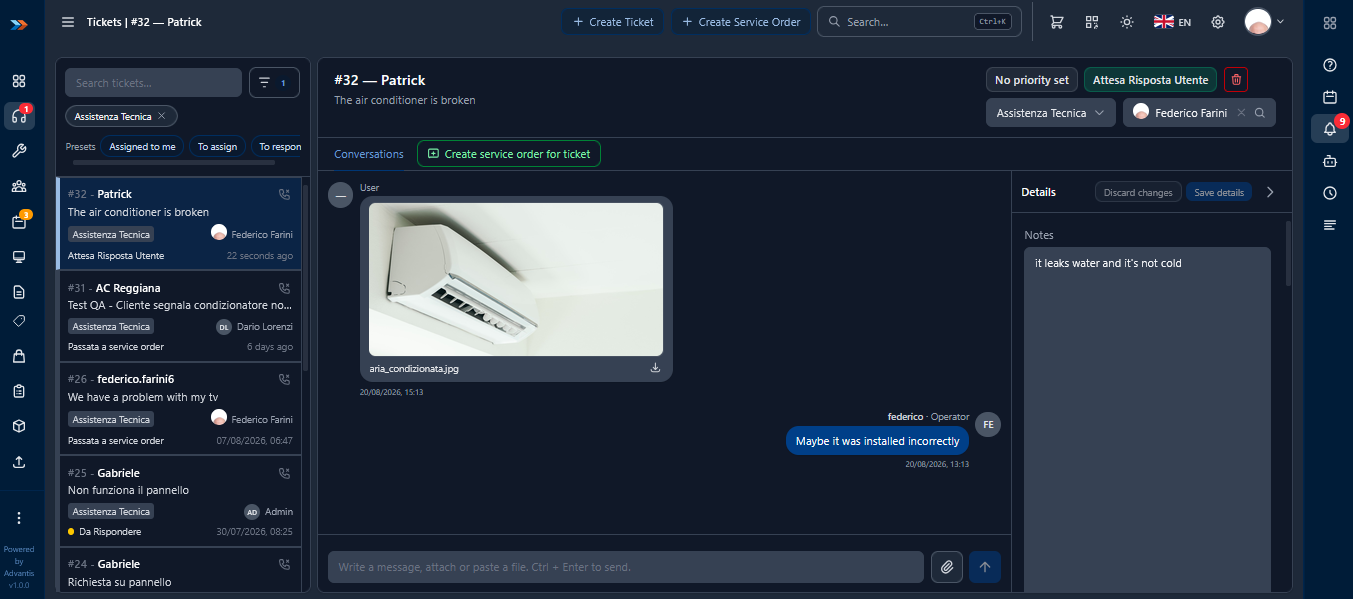
Tickets can be assigned to a specific operator or to a work group. Everyone sees the requests they are responsible for and can update status, notes and activities.
The ticket is linked to the customer, the site and the asset involved, so the operator can immediately check contracts, warranties, previous requests and job history.
ADonePRO records the key dates and times of the request. Managers can monitor the time elapsed since creation, since acknowledgement and since the last update.
Emails, notes, photos, documents and files are stored directly in the ticket. All information stays in one place.
Every change is logged in chronological order, so you can always reconstruct who did what, when and with which information.
When the request needs a technical intervention, the ticket can be turned into a service order. Existing information is carried over automatically.
Customers can receive automatic updates on the status of their request. Messages can be customised for each stage of the process.
Product screens
Customer, asset, contract, priority, communications and activity history in one screen.
See how to manage tickets, jobs, technicians, contracts and spare parts in one platform. During the demo we will show the features that best fit your organisation.